White-label marketing software
Own the
software.
Not the hours.
Licence a finished AI marketing platform, put your own name and logo on it, and sell it to local businesses as your software. They sign up with you, log into your product, and pay you.
What this actually is
We built it. You brand it. They pay you.
You do not write a line of code. You licence a finished local marketing platform, put your own name and logo on it, and sell it to local businesses as your software.
The whole model is written out, in twelve free courses.
Open the free classroom →The maths
One licence fee. The rest is margin.
Local businesses already pay this kind of money every month, to someone. The difference with software is that you are not paid for the hours, and the second client costs you almost nothing to serve.
£50 to £500
a client, a month
What you charge is yours to set. Nothing in the platform caps it and we never see the number, so the range here is simply the one the calculator runs on.
One fee
however many clients you sign
The licence is one flat monthly fee, priced to be covered by your first client. Sign the second, the tenth and the fortieth and it does not move.
£5,000
a month, at 20 clients
20 local businesses at £250 each is £60,000 a year of recurring revenue, billed in your name on your own Stripe account. Arithmetic, not a promise.
£0
to add the next one
No per-client fee, no seat fee and no setup fee, so client eleven costs you the minute it takes to send the invite.
Every figure above is an illustration you can change, not a forecast. What you keep also depends on the two costs on our side, and both of those are confirmed in the community before you commit to anything.
See the real numbers, free →The model
Stop selling hours. Sell logins.
Every agency service has the same flaw: it finishes. The site launches, the campaign ends, the invoice closes, and the next month starts from nothing. A login does not finish. It renews, or the client cancels it.
You sell hours
Websites, campaigns, retainers built out of your time. Scoped, delivered, invoiced, done. Then you go and win it again.
The work has an end date
A site launches. A campaign finishes. The invoice closes, and the thing you built stops earning the moment it is delivered.
You are the capacity
Nothing goes out unless you, or somebody you pay, is at a desk doing it. More clients means more people, and more people to manage.
You win it again next quarter
Same client, same pitch, same budget conversation, because none of it renews on its own.
You sell logins
A product with your name on the front. They sign up, they log in, and they keep paying for as long as they use it.
It renews
A subscription on your own Stripe account, monthly or annual. That is the point of it: not sold again, continued.
You set the prices and the plans
Twenty-seven features to switch on or off, usage limits, and how often the agents may run. You decide what each tier includes and what it is worth.
The delivery runs on a schedule
Replying to reviews, writing articles, posting to social, scanning rankings, building the reports. Seventeen scheduled jobs, nobody watching.
The client stays yours
They are billed on your Stripe account, and their website domain points at your host. The commercial relationship is yours, not ours.
Two things are true at once, and the second is why this page is long. The product is finished. Selling it is still a job.
The software does not find you clients. Nobody signs up because a platform exists. You still choose who to approach, have the conversation and close it. What changes is what you hand over afterwards, and that it does not stop.
What it does not doYou are the support desk, under your own name. Your address is carried through the product, the plugin and the upgrade prompts, so a client with a question never ends up talking to a stranger.
What you take onIt is a different sale. Not a project with a start and an end, but a subscription somebody keeps paying for. One of the three tracks in the classroom is about nothing else: finding clients, and keeping them.
What to learn firstThe setup is the short part. The selling is the part worth learning.
See the twelve free courses →What your clients get
The product you put your name on.
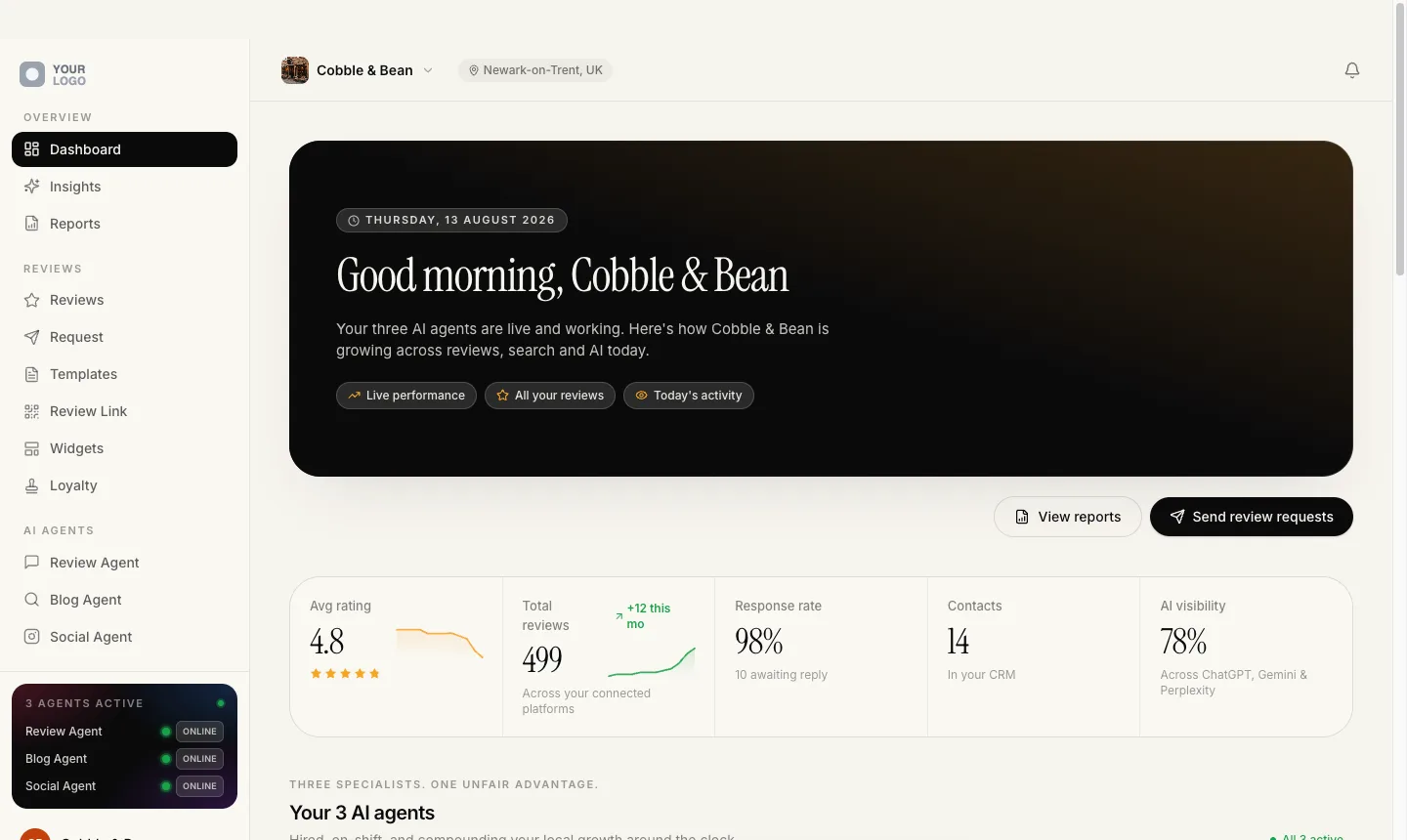
Every screen below is the live platform, with one agency’s logo swapped for a grey placeholder and their name for Your Brand. This is what a restaurant, a garage or a dentist logs into once they are yours.
Get reviewed. Then reply to every one.
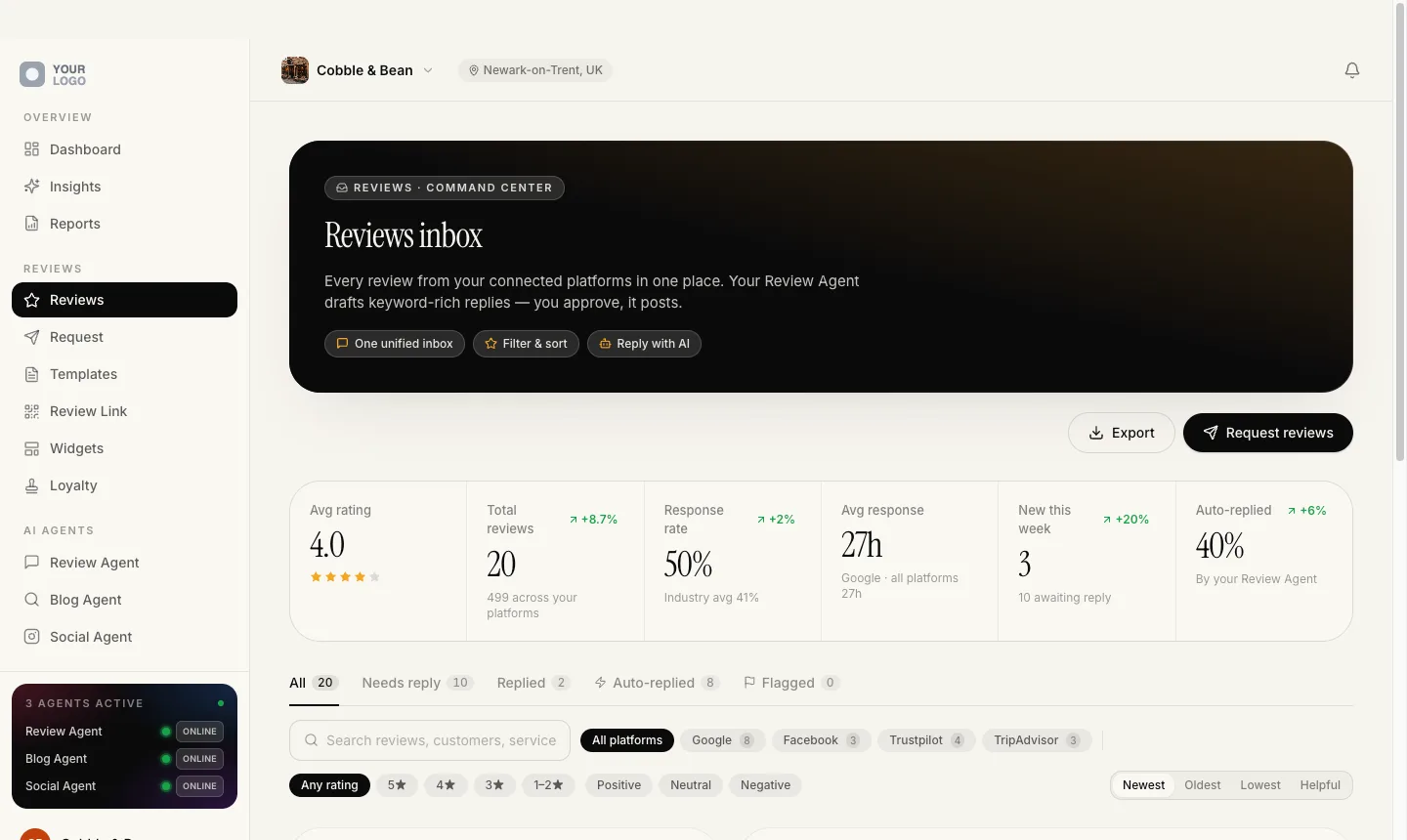
Every owner knows they should ask for reviews and answer the ones they get. Almost nobody does it every week. This is the part of your software they open first, and the part they stay subscribed for.
One inbox, and a reply waiting in it
No more logging into four dashboards on a Monday morning to find the one-star review that landed on Friday night.
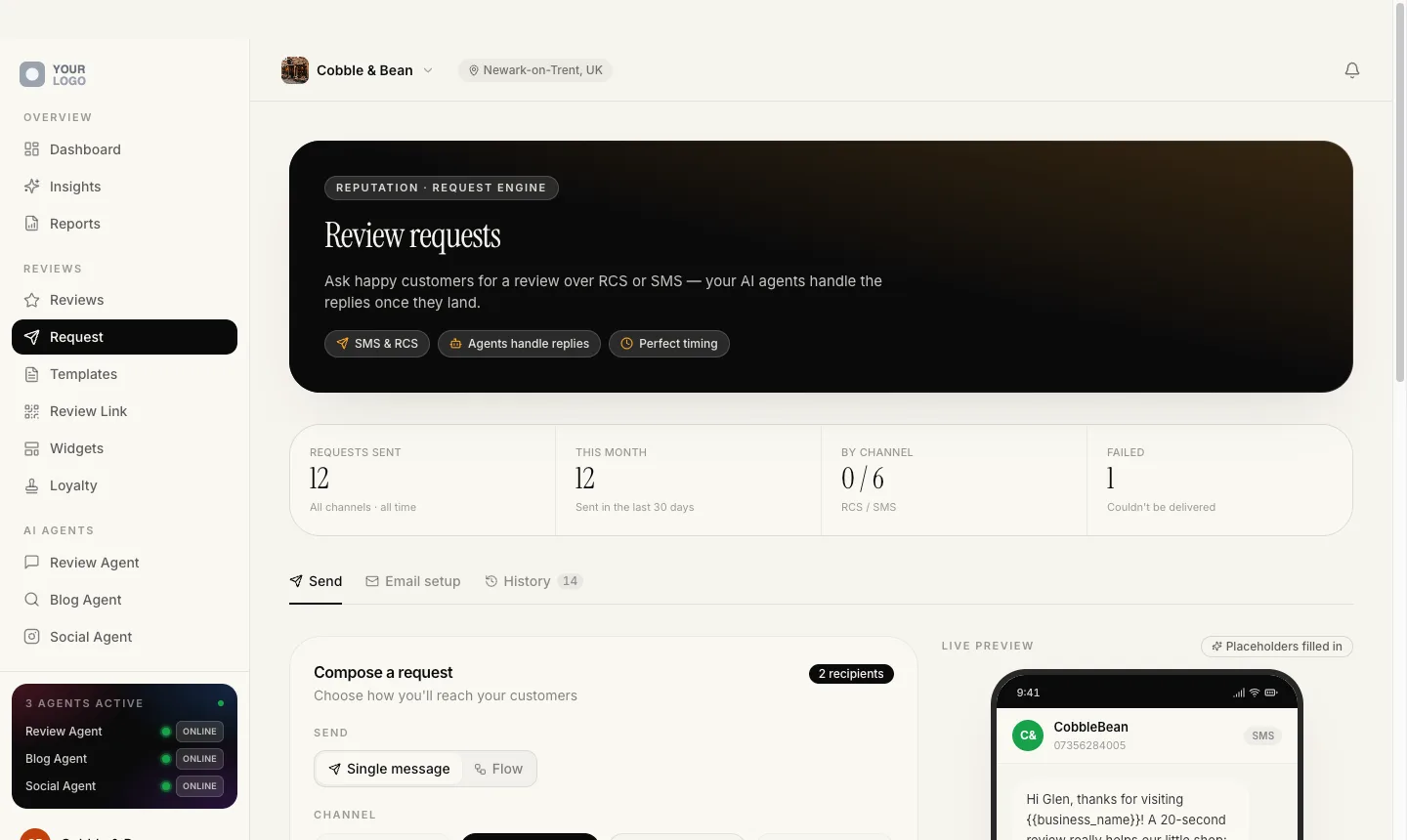
Asking for the review, without the nagging
The business writes the message once. After that it goes out on its own, and it knows when to stop.
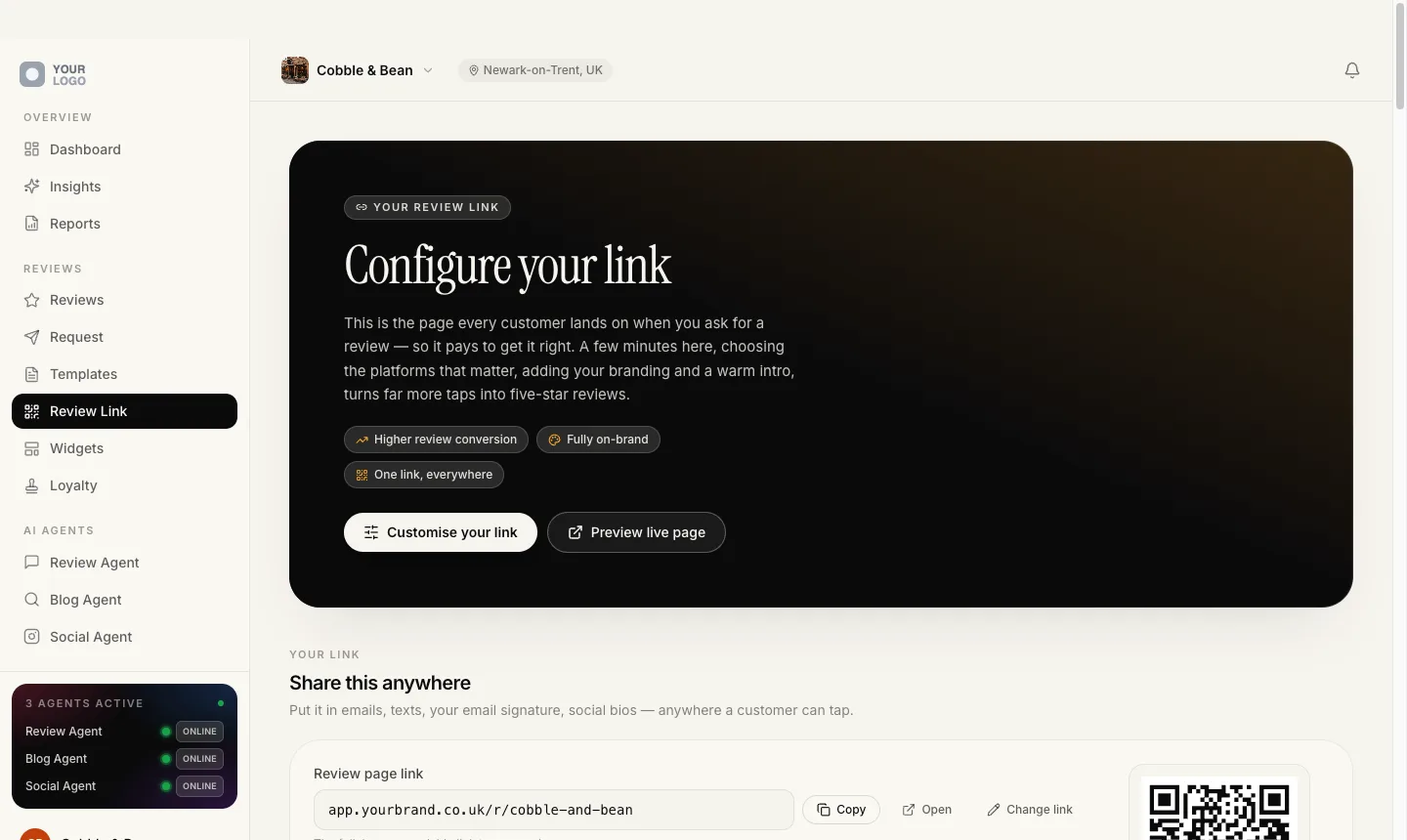
One link, and a QR code for everywhere it goes
The public review page asks for no rating at all. Every visitor sees the same screen: the real review buttons, and a separate private feedback button beside them.
Because nothing branches on a rating, the page is compliant with Google's review policy by construction rather than by promise. Mint as many named QR codes as the plan allows, one per invoice, van or counter, and download each as a print-ready PNG or a vector SVG.
Read the address on that screen. A review link is always minted on your domain. If it cannot be, the message fails to send rather than go out wearing the wrong name.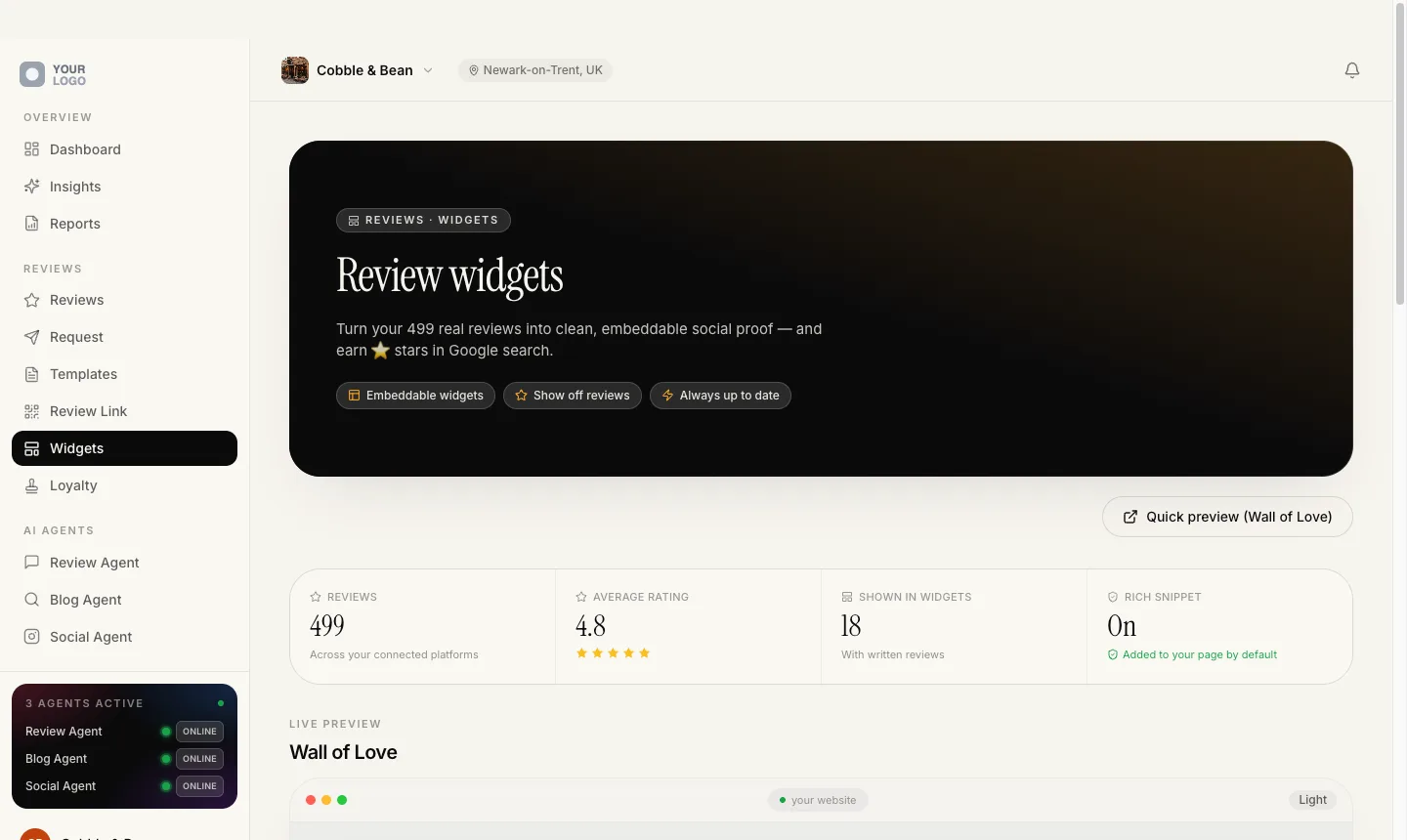
The reviews, back on the client’s website
Nine embeddable widgets, including a JSON feed for developers. One script tag, served from your own domain, sealed inside a shadow root so it cannot inherit or break the page it sits on.
Widgets add review markup for Google automatically, and skip it entirely if the page already has some, so they can never create a conflict.
The wall of reviews is previewed light or dark before it goes anywhere near a live page.Why this is the part you lead with
Ninety-nine written lessons on what to charge for this and how to pitch it. All free.
Read the free lessons →Get found. By people who have never heard of them.
Reviews work on the people who already have the name. This is the half that reaches the ones who do not: a website that keeps itself current, articles aimed at what their town actually types into Google, social posts that go out without anyone opening a calendar, and the Google listing edited from the same screen.
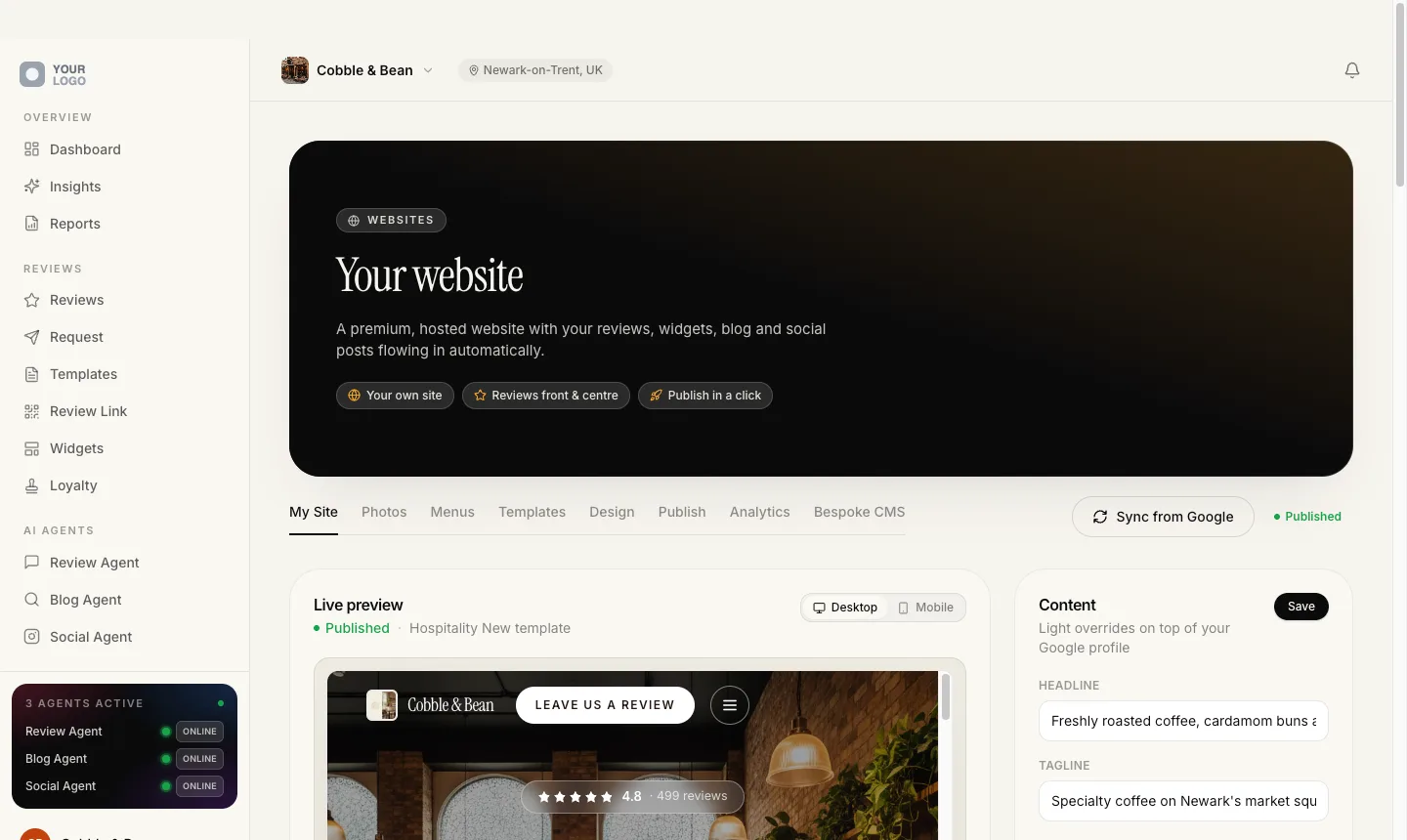
A website that builds itself from their Google listing
Plenty of local businesses have nothing worth sending traffic to. This one assembles itself out of the listing they already maintain, so the site is right on the day it goes live and stays right afterwards.
Articles written from the reviews they already have
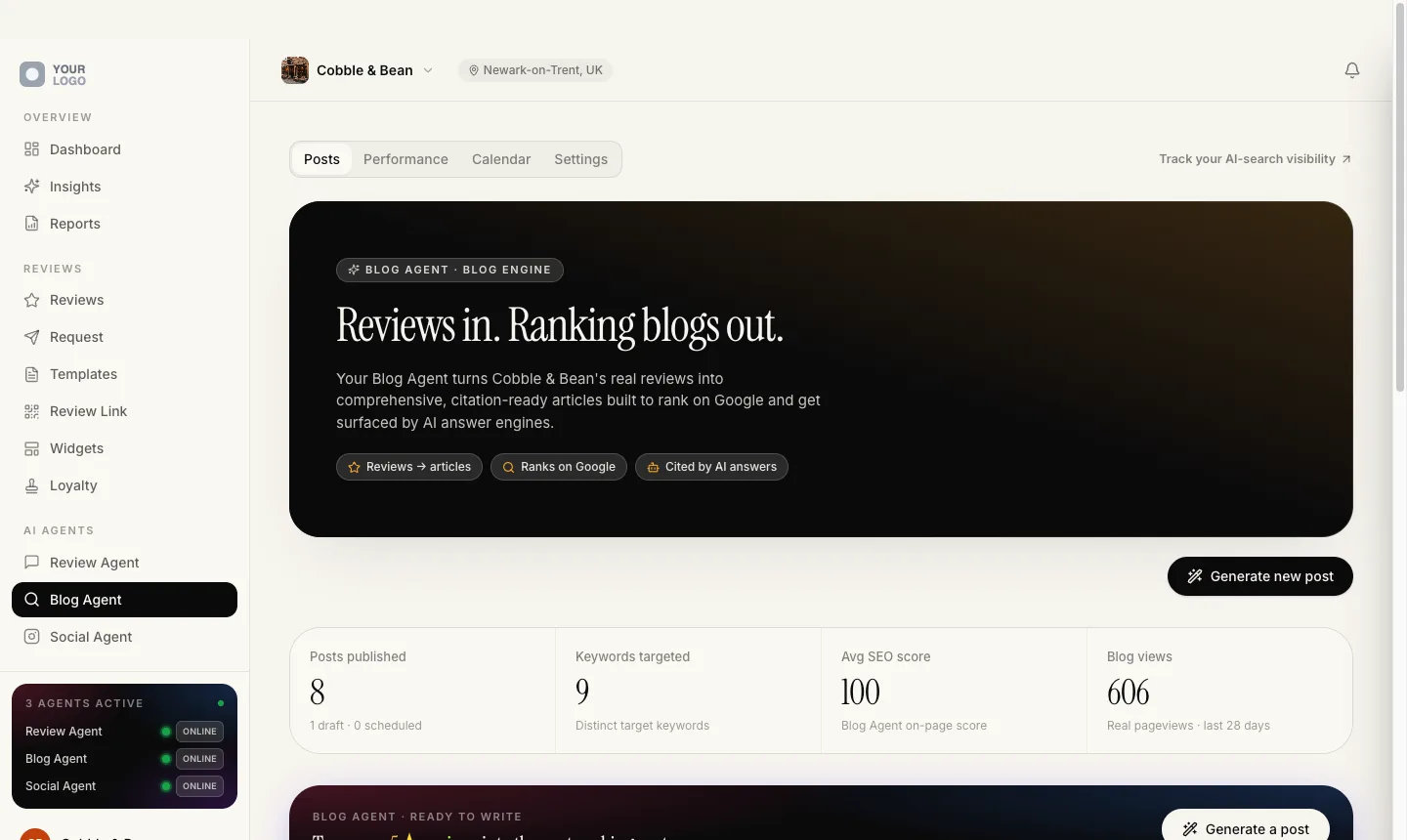
The Search Agent writes local SEO articles from the client's own reviews, then shows what each one did: its live Google rank, how many places it moved, real pageviews, and its Search Console clicks and impressions. It writes in ten languages.
One post a day, or nothing at all
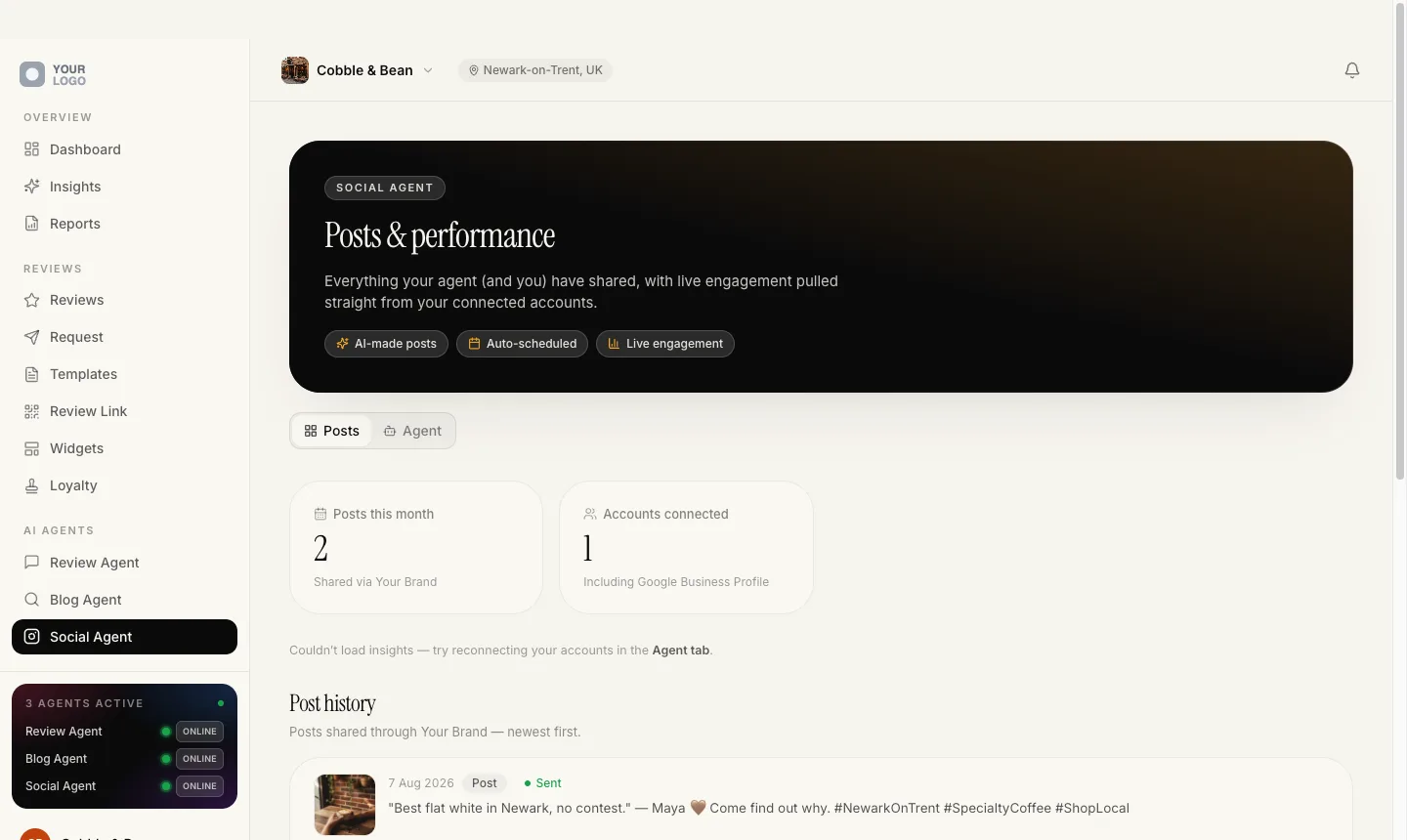
The Social Agent picks the strongest un-posted five-star review each day and publishes it as a branded square post and a 9:16 story.
Their Google listing, edited from inside your platform
Edit the client's Google Business Profile from inside your platform: description, phone, website, regular and special hours, services, attributes and social links, written straight back to Google. Nobody has to be talked through a second dashboard on the phone to change a phone number.
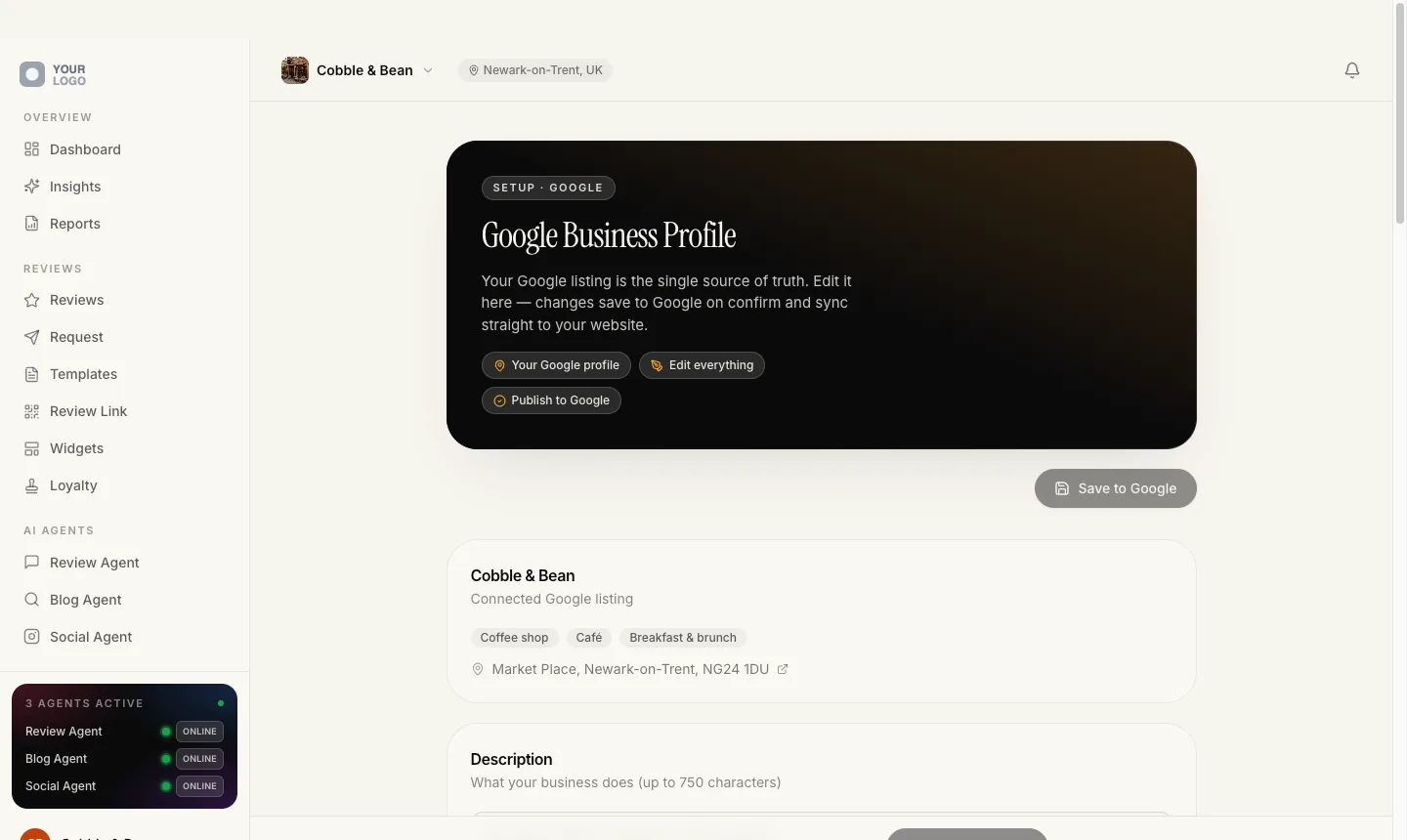
All four of these sit in one plan, at a price you set.
Get inside the community →Prove it and keep them
What you show on the monthly call.
Reviews get you in the door. This is what you put on the screen when a client asks what they are paying for: five screens that answer the question, and one that brings their customers back.
See exactly where they rank, street by street
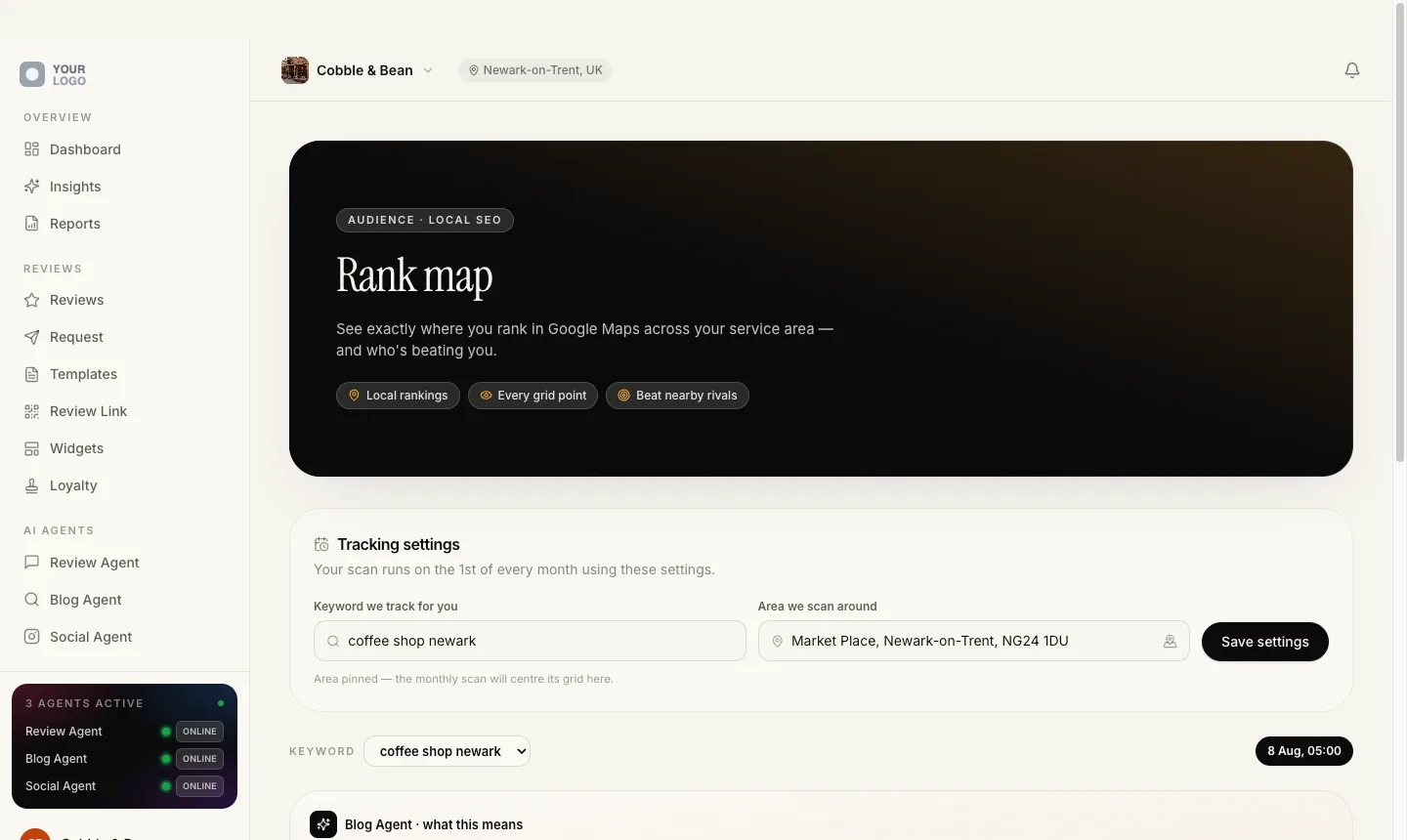
Scan the client’s service area against Google Maps on a grid, 3 by 3, 5 by 5 or 7 by 7, and get their average rank, their best rank and a visibility score for the whole area.
It turns local search from an abstraction into a picture of the streets your client actually works, which is why it is worth opening first.
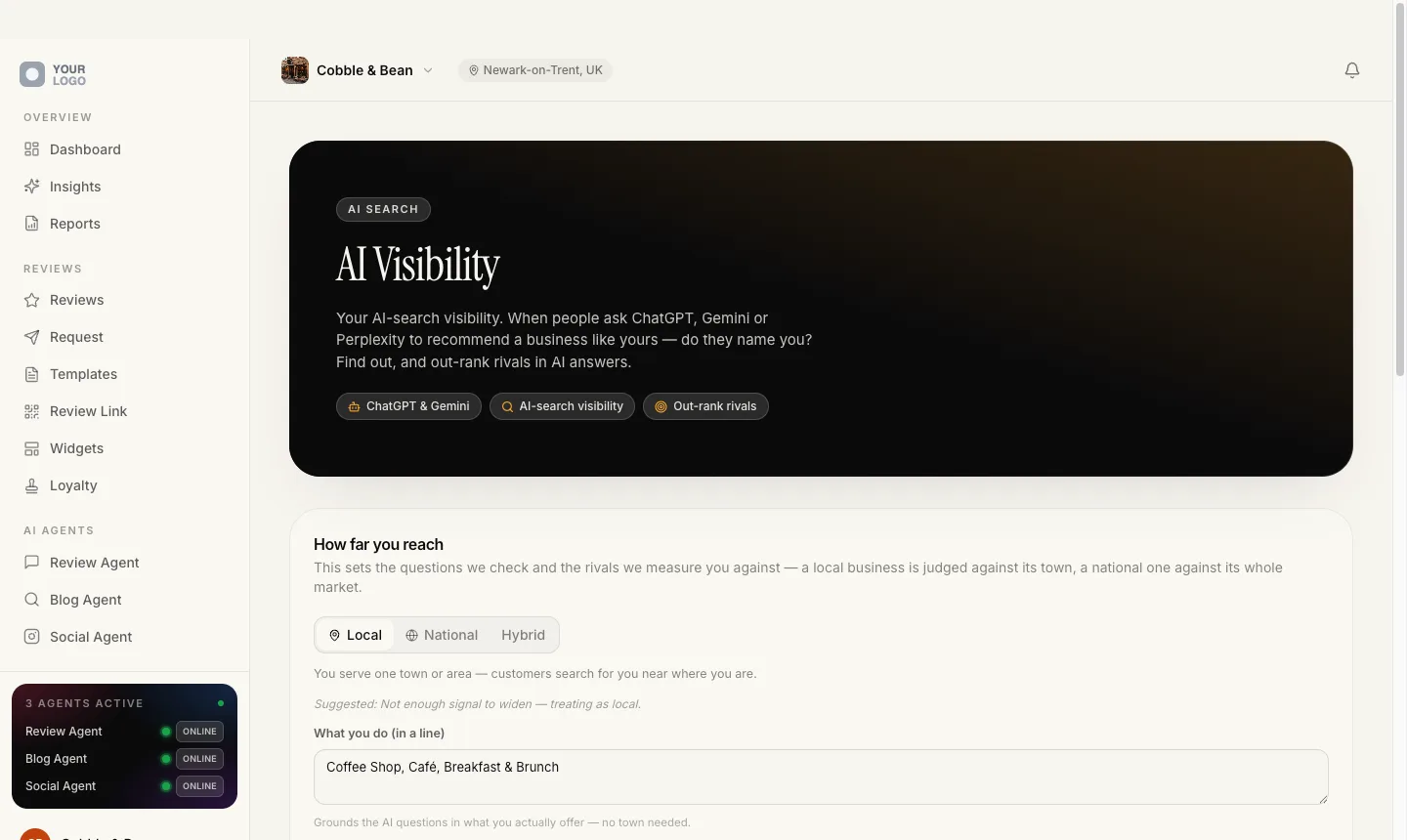
Ask ChatGPT, Gemini and Perplexity whether they recommend them
Three assistants are asked whether they would recommend the business, on live web-grounded answers, and the position it came back in is recorded.
It is a new question, and on this screen it has a number attached to it rather than an opinion.
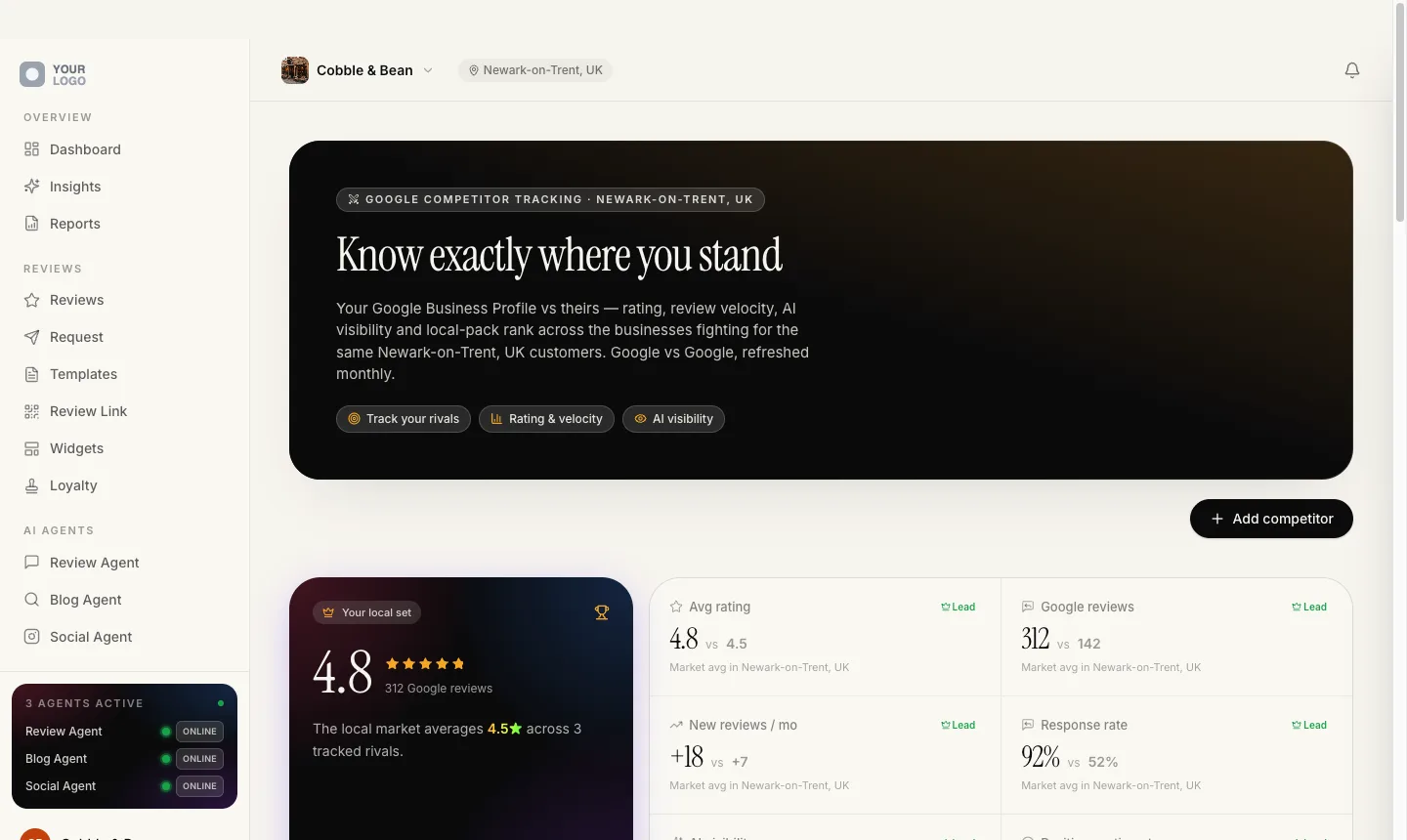
Rivals you picked, side by side
You choose who to track by searching a name, a trade and a town, then picking the right Google listing. Nothing is assigned automatically. Each rival is refreshed monthly on rating, review count, new reviews, how often the owner replies and local rank.
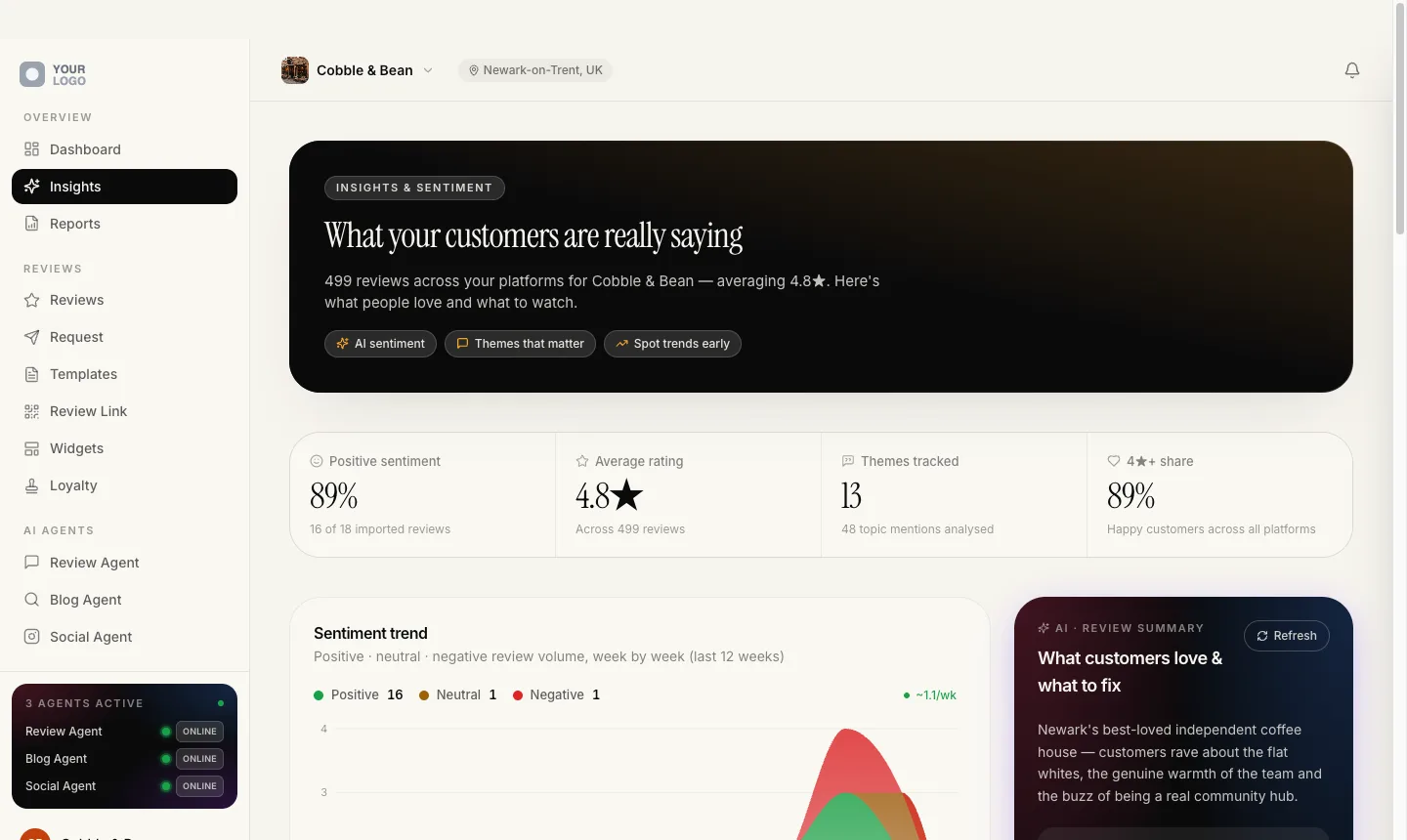
What the reviews actually say
Sentiment, recurring themes and review volume over time, every figure computed from reviews the business really received. Anything that cannot be sourced from a review is left out rather than estimated.
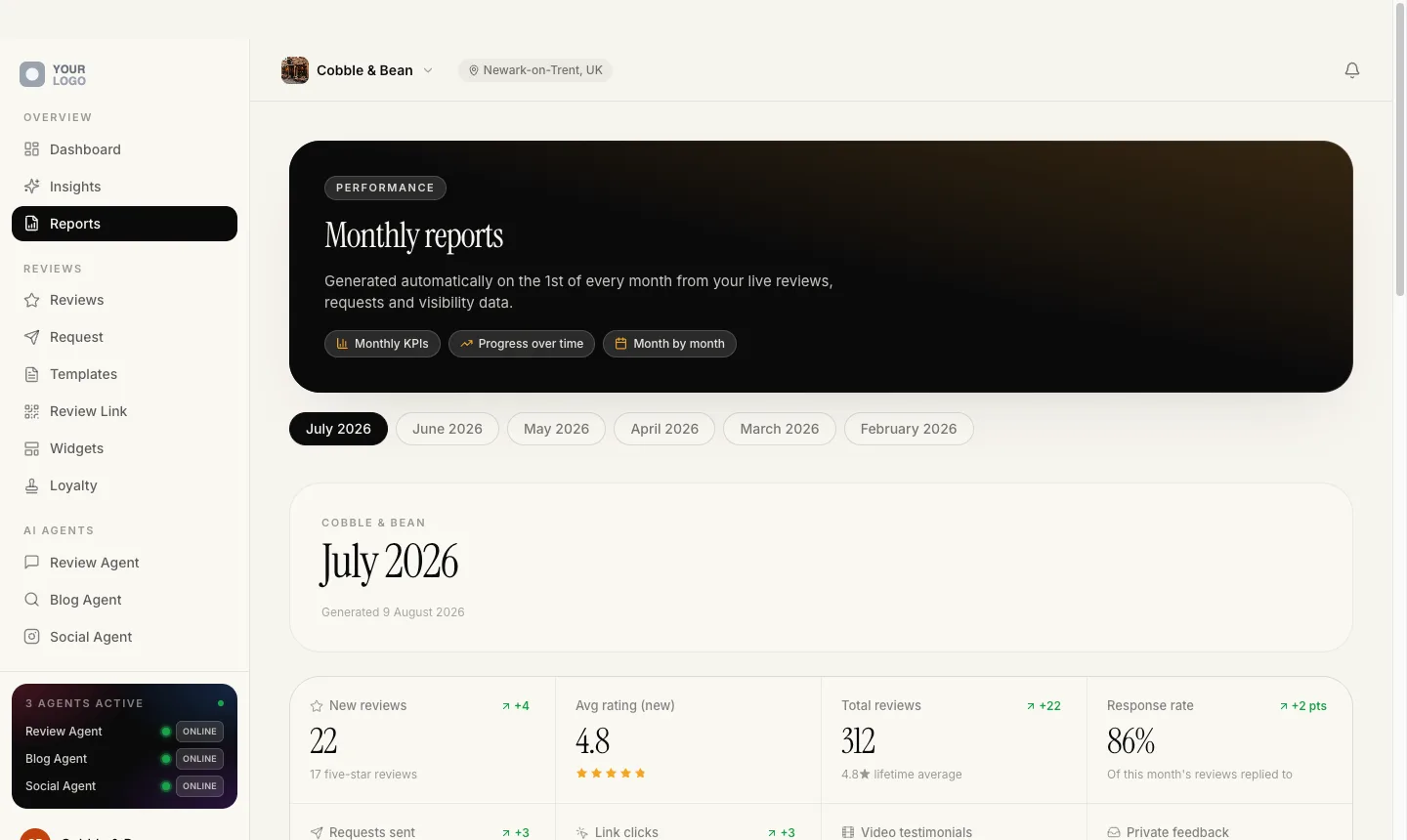
A month by month record
Each month gets its own page, built from timestamped activity and opening in plain English with what happened. A month with nothing in it gets no page at all, because there is no filler month.
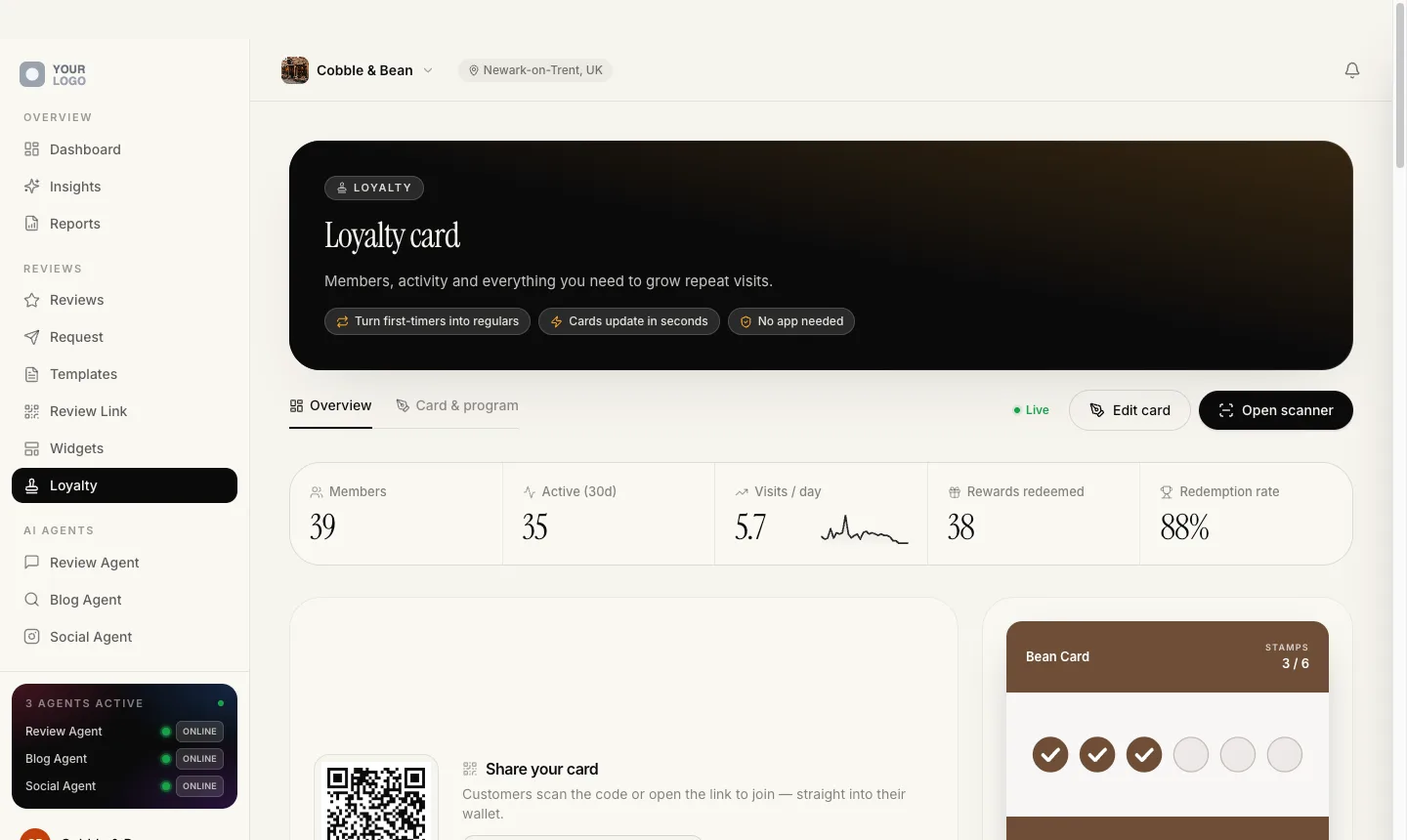
The reason they come back
Stamp cards and points cards that land in Apple Wallet and Google Wallet from one issue, with no app to download. Staff stamp, add points and redeem from the camera in a browser: no till integration, no extra hardware.
Twelve free courses. One whole track on finding clients and keeping them.
Read the free classroom →The three AI agents
The work happens without you.
An agent here is not a chatbot waiting to be prompted. Each one has a single job, a schedule and limits you set, and it carries on doing that job when nobody is logged in.
Review Agent
Every review from Google, Trustpilot, TripAdvisor and Facebook lands in one inbox, and the reply is drafted in the language the reviewer wrote in, in one of four tones and three lengths. Switch on Autopilot and it posts to Google by itself, hourly, only inside the window you set.
It cannot ambush anyone. It fails closed without a cut-off date, so switching it on can never mass-reply to years of history.
Search Agent
It writes local SEO articles out of the client’s own reviews, using only four-star and better ones with something written in them, and it rotates who it quotes so the same customer is never used twice running. It writes in ten languages, and reports back the live Google rank each article earned and how many places it moved.
It invents nothing. Eleven writing rules govern it, and above all it may not make up a fact, a figure or a quote.
Social Agent
Each day it takes the strongest five-star review nobody has posted yet and publishes it as a branded square post and a nine by sixteen story, to Google Business Profile, Facebook, Instagram, LinkedIn and TikTok.
Silence is allowed. On a day when nothing genuinely qualifies, it posts nothing at all rather than pad the schedule.
Even their names are yours
Review Agent, Search Agent and Social Agent are the names we ship. They are not the names you have to sell.
One field, no code
Type your own name for each agent on your branding page, up to twenty-four characters. Nothing is rebuilt and nothing is redeployed.
Every surface follows
The app your client logs into, their hosted website, the example client you demonstrate with, and the seventeen-page client report. One resolver hands the name out, so a rename can never land on some screens and not others.
Your words, untranslated
A name you type is treated as a proper noun and used exactly as you wrote it, in every language the platform runs in.
The build enforces it
If a hardcoded agent name creeps back into the product’s copy, the build fails before it can reach a client.
What they will not do
The status in your client’s sidebar is not decoration, and neither agent is allowed to make a mess on your behalf.
Online means online
An agent reads Online only when it is genuinely running hands-free. Otherwise it reads Manual, and every place that count appears takes it from the same source.
It arrives like a person
Replies trickle out rather than land in a burst, because a burst of replies reads as a bot to anyone looking at the profile.
It would rather do nothing
The review and social agents both fail closed. An agent that cannot do the job properly does not quietly do a worse version of it.
Your logo, your software
The only brand on it is yours.
Everything on the screen below is the live product. We have swapped one agency’s logo for a grey placeholder and their name for Your Brand, because those are exactly the parts that would be yours.
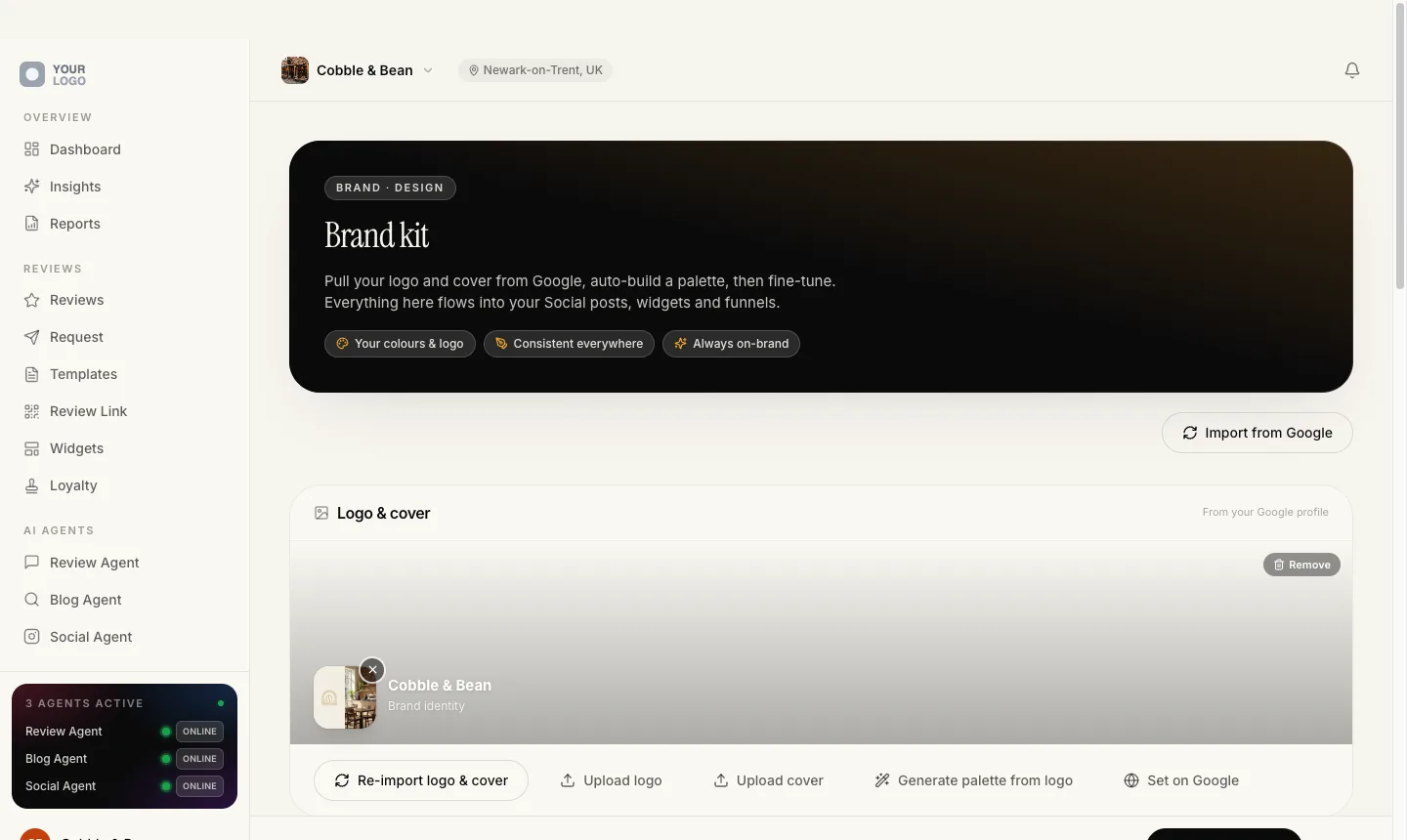
Your logo, your fonts
Branding is a form. Upload a logo, pick two fonts and an accent colour, and the whole platform changes. Thirty-two typefaces are already self-hosted, so your clients’ pages never call out to a font service.
Your domain
Your clients log in at your address, and their websites point at your host, so even the record in their registrar shows your domain. Custom domains come with automatic SSL.
Your Stripe
Your client pays you and the charge lands on your Stripe account. Your name, logo, icon and accent colour are pushed onto it, so checkout, the billing portal and every invoice carry your brand.
Your WordPress plugin
The plugin your client installs is generated for you rather than rebranded. The plugin name, the author, your support contact and your privacy link are substituted into it and zipped when you download it.
Your email
Email can go out from your client’s own mail server, from your agency’s sender, or from your own verified sending domain.
Your report
The client report is a seventeen-page PDF in your fonts and colours, with your agency as its author. Seventeen pages for every client, on every plan, in every language. You generate it, and you are the one who sends it.
Brand leakage is a boundary, not a preference
The function that builds a client-facing address refuses to fall back to one of ours. It fails instead.
A review link is always minted on your domain. If it cannot be, the message fails to send rather than go out wearing the wrong name. Anything that has to be shared between agencies runs on a neutral domain with no brand on it at all.
We caught one, and we are telling you
An authentication email once carried a link that could fall back to a platform address. It was found, fixed and shipped.
We will tell you about the next one in the same way. That is a more useful promise than claiming there has never been one.
Your logo, your domain, your prices, on a platform you did not have to build.
Look inside the free community →How you launch it
Configuration. Not code.
The platform is already built, already running and already answering reviews for real businesses today. Launching your own version of it is four sittings with a laptop: your brand, your Stripe, your plans, your demo. Nothing to clone, nothing to host, nobody to hire.
Put your name on it
Branding is a form. Upload a logo, pick two fonts and an accent colour, and the whole platform changes: the half you work in and the half your clients log into. Thirty-two fonts are already self-hosted, so your clients’ pages never call out to a font service.
Point it at your Stripe
Connect your own Stripe account. Your name, logo, icon and accent colour are pushed onto it, so checkout, the billing portal and every invoice carry your brand. Your client pays you, and the charge lands on your account rather than ours.
Decide what you sell
Build your plans: twenty-seven features to switch on or off, usage limits, how often the agents may run, which review sites and which social networks are included. You set the price, the currency and whether it renews monthly or yearly.
Get something to show
Every agency gets a fully loaded example client on its own subdomain, with no login, reseeded every Monday so it never looks stale. Need one that looks like the business you are meeting? Type a line, like a wood-fired pizzeria in Brighton, and the platform builds it.
You do not have to keep track of any of it. Setup is a twelve-item checklist on your own dashboard, and the platform ticks eleven of them off by watching what you have actually done: the domain is verified or it is not, the logo is uploaded or it is not. Exactly one cannot be read without calling Stripe every time you load the page, so that is the single item you tick yourself. Here is the whole list, because its length is the point.
- Your sending email. So mail reaches your clients from your own domain, not a shared default.
- Your domain records. Point a domain at your example client and add the DNS records.
- Stripe connected. So client subscriptions pay out to you.
- Your payment methods. Cards, iDEAL, Bancontact, SEPA Direct Debit and Klarna. This is the one the platform cannot detect, so it is the one you tick.
- Your API keys. Your own AI and SMS keys, so usage bills to you at cost.
- Your tax settings. Optional. Turn on tax and add your VAT registration for compliant invoices.
- Your logo and favicon. Your marks replace the defaults across the whole platform.
- Your website address. The link on review pages sends customers back to you.
- Your support email. Optional. Where clients reach you, carried through the product.
- Your fonts. One for body text, one for headings.
- Your brand colour. The accent on every button and every highlight.
- Your WordPress plugin. Optional. Name the plugin your clients install and add your support details.
Nothing on that list is engineering. There is no repository, no server, no deployment and no build to break at midnight. Seventeen scheduled jobs already run the recurring work, from every five minutes to once a week, with nobody watching. The only two things that take real time are outside all of us: a DNS record propagating, and Stripe deciding it believes who you are.
One of the three tracks in the classroom is setting your platform up, written out step by step.
Take the setup course, free →How you sell it
The hard part is not the software.
Running this is the easy half. Finding the first ten people to sell it to is the work, so the agency side of the platform is built for exactly that: find them, pitch them, track them, sign them in one run, and keep score once they are yours.
Audit a business you have not signed
Generate a branded audit for a business you have not signed yet, and share it on a link that sits on your own domain. It handles businesses that hide their address, which most tools get wrong, by resolving the real town instead of trusting the coordinates the data feed hands back.
A pipeline that closes its own deals
An eight-stage sales pipeline as a drag-and-drop board or a list, with the deal value totalled per column. When a prospect pays through your plan’s link, the deal closes itself and takes on their real monthly value.
Quiz funnels on your own subdomain
Build mobile-first quiz funnels in a visual builder, publish them on your own subdomain, and every completed quiz lands in your CRM as a tagged lead with the answers in the notes. A new funnel opens already filled in with a complete starter, in your own language.
Sign a client in one run
Adding a client is one guided run of seven steps: connect Google, import the listing, build the brand kit from their own photos, mint the review link, generate the intro reel and the social art, and find their other review pages. Then send a no-login link and they connect their own Google and social accounts in a five-step wizard, on your brand.
Sixteen explainer decks in your brand
The conversations you have over and over, already written and laid out in your fonts, your colours and your logo: the whole picture for a first meeting, one deck for each agent, one for each part of the product. These are switched on per agency rather than being there on day one, and so are the referral tools.
Score the whole roster monthly
One comparable snapshot of every client for a chosen month: who gained the most reviews, whose rating climbed and who lost momentum, without opening a single account.
Three decisions in there that you would never think to ask about, and would notice the first time they mattered.
Raw inbound enquiries sit in their own inbox column and are kept out of your pipeline value, so unqualified leads never inflate your own numbers.
Pipeline valueThis month’s figures are paged to completion, so they are exact. Only the lifetime average can be approximate, and it says so when it is.
The leaderboardThe link you send a client to connect their accounts never offers a disconnect button. The client only ever confirms.
The connection portalThe classroom covers what to charge, who to sell to, and how to get the first client through the door.
Learn how to sell it, free →What it costs you
Two costs. Both to be confirmed.
We are not going to put a number here that we might change. The shape is settled and the figures are not, so here is the shape.
The licence TBC
One flat monthly fee for the white-label licence, the same whether you have one client or a hundred. No per-seat fee, no per-client fee, no setup fee.
A platform fee TBC
A percentage of what your clients actually pay you, taken automatically through Stripe Connect, so there is no invoice to settle and nothing to reconcile. Collect nothing from a client, pay nothing on them.
Both numbers are confirmed inside the community, before you commit to anything. You will also bring your own keys for the AI provider, the local search data provider and SMS, and those bill to you at cost.
Every one of them signs up with you and pays you, not us.
£150 is an illustration, not a recommendation. You set your own prices.
a month, which is £18,000 a year, billed by you on your own Stripe account
What you keep: TBC
We have not set the licence or the platform fee yet, so we are not going to show you a number for either. Both are confirmed inside the community before you commit to anything. Stripe's own card processing fee is separate again, and that one is between you and Stripe.
You set the prices. We never see your clients and we never contact them. They pay you through your own Stripe account, in your name, and our fee comes off automatically once it is set, so there is nothing to invoice and nothing to reconcile.
| Clients | Your client revenue | Per year | Licence | Platform fee | You keep |
|---|---|---|---|---|---|
| 1 | £150 | £1,800 | TBC | TBC | TBC |
| 3 | £450 | £5,400 | TBC | TBC | TBC |
| 5 | £750 | £9,000 | TBC | TBC | TBC |
| 10 | £1,500 | £18,000 | TBC | TBC | TBC |
| 25 | £3,750 | £45,000 | TBC | TBC | TBC |
Both figures are printed in the community, before you commit to anything.
See the pricing inside →The free classroom
Read the whole thing first.
The group is free to join and nothing in the classroom is locked. Twelve courses and ninety-nine written lessons: what the model actually is, what to charge, how to set your own platform up, and how to find the first client.
3
Tracks: understand, build, sell.
12
Courses, in reading order.
99
Lessons, all written out in full.
64,000
Words, free to read today.
What is waiting inside
 Covers from the classroom. Every course below is written, open and in there now.
- 01Start Here5 lessons. How the community works and the fastest route through it.Foundations
- 02What Is RepSaaS?6 lessons. The model in plain English, the maths, and who buys it.Foundations
- 03Your Offer & Pricing6 lessons. Pick a niche, build a plan ladder, decide what to charge.Foundations
- 04Launch Your Platform10 lessons. Zero to live and taking payments, in order, nothing missed.Build
- 05Your Agency HQ12 lessons. Every screen in your agency panel.Build
- 06The Client Platform18 lessons. Every screen your clients see, so you can support it yourself.Build
- 07The AI Agents6 lessons. Review, Search and Social, and how to sell them as staff.Build
- 08Get Your First Client6 lessons. The thirty-day plan, and where the conversations come from.Grow
- 09The Prospecting Machine7 lessons. Audit reports, target lists, the CRM and lead funnels.Grow
- 10The Sales Cycle7 lessons. Scripts, pricing the room, and the nine objections you will hear.Grow
- 11Trial to Paid8 lessons. Design the trial and convert on purpose instead of hoping.Grow
- 12Retain & Expand8 lessons. Churn signals, upgrades, referrals and your first hire.Grow
All of it is sitting there right now.
You do not have to decide anything today. Join, read the twelve courses, see the pricing, and take it from there. If it is not for you, you have lost nothing but an evening.
Straight answers
The awkward questions.
Everything people ask before they take this seriously, answered the way we would answer it in the group.
Do I need a developer, or any technical skill?
No, and there is nothing to build. The platform is finished, live, and answering reviews for real businesses today. Your part is filling in forms: a logo, two fonts, an accent colour, your Stripe account, and the plans you want to sell.
Setup is a twelve-item checklist, and the platform ticks eleven of them off by watching what you have actually done, so you always know what is left.
What exactly am I selling?
A monthly subscription to your own local marketing platform. Your client logs in under your logo and finds every review from Google, Trustpilot, TripAdvisor and Facebook in one inbox, a website built from their Google listing, their local rankings scanned on a map, wallet loyalty cards, and a branded report on what happened.
Three AI agents do the recurring work. One drafts replies to reviews in the reviewer’s own language, one writes local SEO articles from the client’s own reviews, one turns five-star reviews into branded social posts. You sell the outcome. They do the shift.
Do I need clients before I start?
No. Every agency gets a fully loaded example client on its own subdomain, with no login, reseeded every Monday so it never looks stale. Nothing a visitor clicks on it sends, posts or charges anything for real, so you can show it to anyone.
You can also generate a branded audit for a business you have not signed yet and share it on a link that sits on your own domain. That audit is the opener the classroom teaches you to sell with.
How long until I can sell it?
The software is already written, so the only clock running is your own decisions: what to call it, who to sell to, what to charge. Nothing on the setup checklist takes days.
Adding your first client is one guided run of seven steps, from picking their Google listing to minting their review link. A weekend is a realistic target for a platform that is live, branded and taking payments.
What if I have never sold software before?
Then sell what your buyer already understands: more reviews, showing up on Google Maps, a website that keeps itself current. The software is how it gets delivered, not what you pitch.
The selling tools come with it. A branded audit for a business you have not signed, an eight-stage pipeline, quiz funnels on your own subdomain that drop leads straight into it, and a payment link for each plan that sets a client up the moment they pay. Five of the twelve free courses are about nothing else.
Is it really my brand, or is yours hidden in there somewhere?
Yours, down to the parts you would not think to check. Your logo, your domain, your fonts, your colours, your Stripe checkout and invoices, and a WordPress plugin generated with your name inside the code rather than rebranded on the surface.
Even the three agents are renameable: call them what you like and the whole product uses your names, including the documents it generates. The function that builds a client-facing address refuses to fall back to ours. It fails instead. Brand leakage is treated here as a boundary, not a preference.
What happens when a client asks a technical question?
You answer, under your own name. Your support address is carried through the product, the plugin and the upgrade prompts, so nothing your client clicks ever dead-ends at a stranger.
Behind you: a course that walks every screen your clients see, and a community where the person replying is the one who built the platform. Your client never talks to us, and never needs to.
What does it cost?
Both numbers are still to be confirmed, and we would rather say that than print something we might change. There are two costs and only two: a flat monthly licence, and a percentage of what your clients pay you. Both are confirmed inside the community, before you are asked to commit to anything.
Are there any other costs?
You bring your own keys for the AI provider, the local search data provider and SMS. Those bill to you at cost and rise with usage. That is the only other line, and you can see every one of them itemised per client inside the platform.
Can I leave?
Yes, and your clients are yours the whole time you are here. They are billed on your own Stripe account and their website domains point at your host, so the commercial relationship never sits with us.
The one part we cannot make painless is the software itself. Your clients log into a platform we run, so leaving means moving them onto something else. We would rather you knew that now than found it out later.
Got one that is not on this list?
Ask it in the community →Start your platform.
Twelve courses and ninety-nine written lessons on what this is, what to charge and how to sell it. Read the lot, then decide.